Categorization Type
A categorization is a set of categories (classes) used to label the cells of a Categorical Map — each category defined by a value, a name, and a display color.
GUI Editor
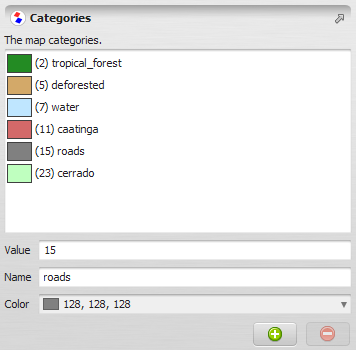
EGO Script
A constant representing a set of categories is written in EGO Script using the following syntax:
[
  1, "Rondonia", (139, 35, 35),
  2, "Acre", (105, 211, 169),
  3, "Amazonas", (149, 149, 238),
  4, "Roraima", (177, 177, 66),
  5, "Para", (238, 203, 149),
  6, "Amapa", (62, 12, 96),
  7, "Tocantins", (238, 149, 149),
  8, "Maranhao", (51, 255, 204),
  9, "Mato_Grosso", (211, 105, 211)
]
Each line describes one category through three elements: its value, name, and color.
- Value — a signed 32-bit integer corresponding to a cell value in a categorical map, in the range -2,147,483,648 to 2,147,483,647. Ex:
-10,1,200. - Name — a non-empty string enclosed in double quotes. It must start with a letter, followed by letters, numbers, and underscores (
_). Ex:"forest","deforestation","class_1". - Color — a three-element tuple enclosed in parentheses, using the (R, G, B) notation: red, green, and blue components, in that order. Each component must be in the range [0, 255]. Ex:
(255, 0, 0),(128, 128, 128).(0, 0, 0)is black and(255, 255, 255)is white.
Commas between elements are optional. Categories do not need to be contiguous.
Note: Because a category value is a signed 32-bit integer, a categorization cannot be attached to a map whose cell type is Unsigned 32-bit Integer or Float 32-bit — neither type can represent the full range and precision of a signed 32-bit integer.
Note: A categorization accepts at most 2,000,000,000 categories; defining more raises an error. This default is used in most situations and is rarely a practical limit.
Automatic Conversions
- Converted from: Table Type, Categorical Map — a Categorical Map converts directly to its Categorization, extracting the value/name/color definitions already attached to the map; this is a separate, one-way path from the Table Type conversion below and does not pass through a Table.
- Converted to: Table Type.
The Table Type conversion works in both directions — from a Table into a Categorization, and from a Categorization into a Table. In either direction, the table must have the following columns, in order:
| Column | Type | Description |
|---|---|---|
| Category value | *#real (key) | The category value. |
| Category name | #string | The category name. If left blank when converting into a Categorization, the category is automatically named using the pattern class_N — or class_nN if the value is negative, where N is the absolute value — the same fallback used for any category left unnamed. |
| Category red color | #real | The category’s red color component, in the range [0, 255]. |
| Category green color | #real | The category’s green color component, in the range [0, 255]. |
| Category blue color | #real | The category’s blue color component, in the range [0, 255]. |
The following CSV table represents the same categories shown in the EGO Script example above:
Value*, Name, Color_Red, Color_Green, Color_Blue,
1, Rondonia, 139, 35, 35,
2, Acre, 105, 211, 169,
3, Amazonas, 149, 149, 238,
4, Roraima, 177, 177, 66,
5, Para, 238, 203, 149,
6, Amapa, 62, 12, 96,
7, Tocantins, 238, 149, 149,
8, Maranhao, 51, 255, 204,
9, Mato_Grosso, 211, 105, 211
See Type System for the complete conversion reference across all types.